I accidentally deleted some important files from my Mac and realized they weren’t backed up. I’m looking for reliable file recovery software for Mac that can help recover documents and photos without causing more data loss. If anyone has used a trustworthy Mac data recovery tool, I’d really appreciate the help.
I ran into this after I wiped an external SSD during a macOS reinstall. Dumb mistake, expensive lesson. I tested a pile of recovery apps after that, and the one I kept coming back to was Disk Drill.
A lot of Mac recovery apps look clean in screenshots, then fall apart once you start a scan. I saw slow indexing, broken previews, weird APFS support, all of it. Disk Drill felt more stable on newer Macs. It runs fine on Apple Silicon, reads APFS, HFS+, and exFAT, and the steps were easy enough without digging through menus for half an hour.
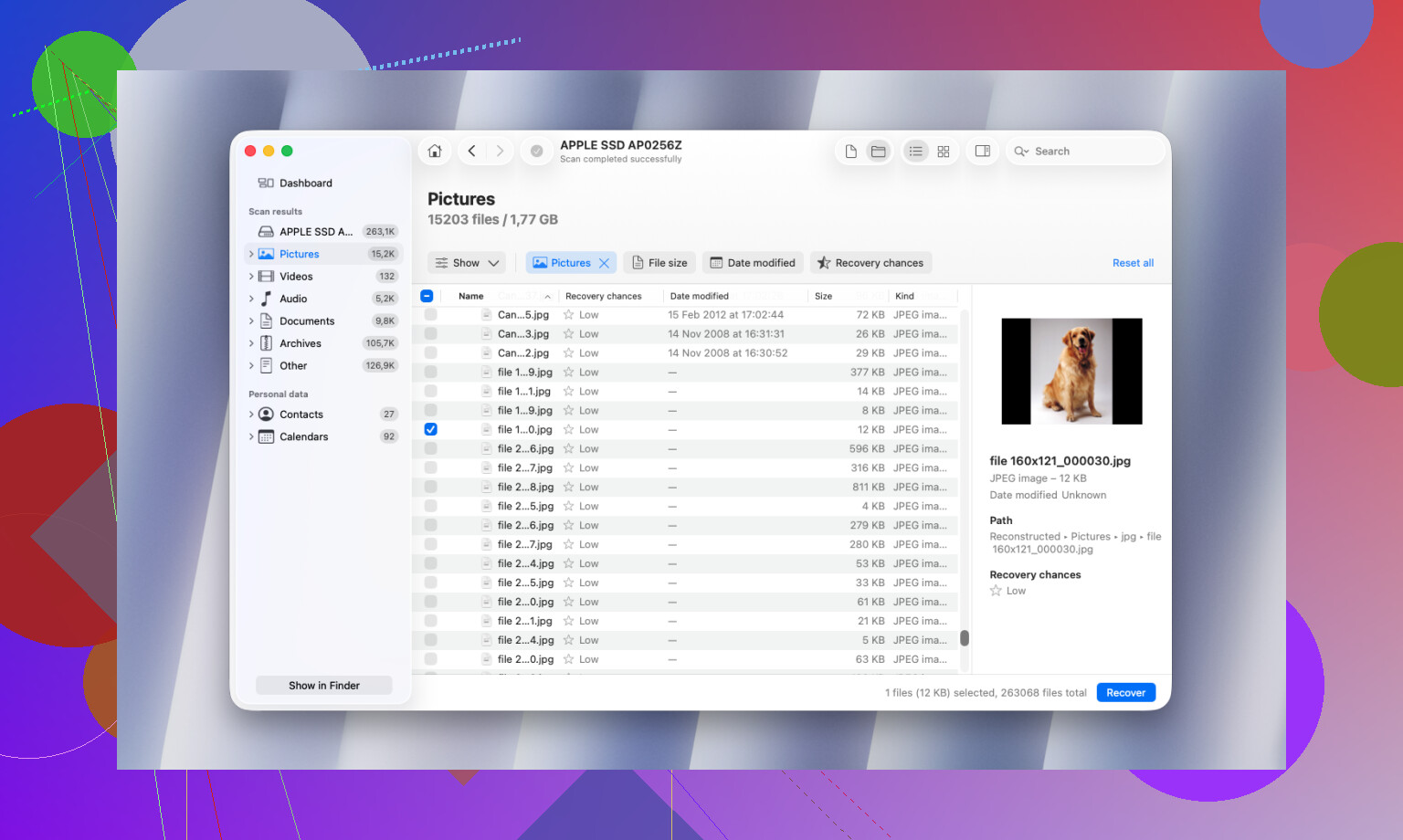
The preview feature mattered more than I expected. Before paying, I checked recovered docs, photos, video clips, and PSDs to see if they were usable. Some tools dump out a huge list of ‘found’ files, then half of them are corrupt or blank. This one was better at showing what was still intact.
What I found useful in it:
- Byte to byte disk backup for drives starting to fail
- S.M.A.R.T. status checks
- Duplicate file cleanup
- Recovery Vault protection
- Advanced Camera Recovery for broken up video files
The disk image option is the part I’d keep installed for. If your drive starts clicking, drops off the desktop, or reconnects at random, cloning it first is often the safer move. I learned this a bit late.
If you’re dealing with heavier stuff, RAID, damaged partitions, NAS boxes, then R-Studio deserves a look. A lot of sysadmin types trust it for ugly recovery jobs. I tried it too. Fast, no question. But for normal people, the interface feels like walking into a control room with no labels. If you like filesystem-level detail, you’ll get along with it. If not, you’ll hate it by minute ten.
I also spent some time with iBoysoft Data Recovery. It handled APFS better than I expected, so I’ll give it credit for that. My issue was the pricing. It kept leaning toward subscription plans, and I’m tired of software doing that for one-off recovery work.
PhotoRec still has a place if free is your hard limit. I’ve used it before. It pulls files by signature, which means you often get the data back, but filenames and folder structure are usually gone. On a big drive, the output turns into a mess fast. You end up sorting thousands of files by hand, which is not fun. It works, though. rough, but it works.
One part people skip over, and this matters more than the app you pick. Recovery success depends a lot on what happened after the data loss. If you kept using the Mac like nothing happened, especially with an SSD, your odds drop fast because new writes start replacing old data.
If you lost something important, do this first:
- Stop using the drive
- Don’t install recovery software onto the same drive
- Save recovered files to a different drive
- If the drive is unstable, make an image before trying recovery
From what I saw, doing those four things changed the result more than swapping between recovery apps.
If you want the short answer, Disk Drill is the easiest place to start on Mac. It tends to handle deleted documents and photos well, and the preview is useful before you spend money. I agree with @mikeappsreviewer on one point, APFS support matters a lot on newer Macs.
I’d disagree a bit on R-Studio for this case. It’s great, but for plain accidental deletion it feels like overkill and slows people down. If you want another solid Mac option, Data Rescue is worth a look too. It has been around forever, and in my tests it was better at keeping file types organized, but slower on large SSD scans.
Small rule that matters more than the app. Recover to a different drive. If your deleted files were on the internal SSD, don’t keep installing stuff there and hoping for the best. SSD trim is brutal.
If your files were deleted recently, try Disk Drill first. If Disk Utility shows drive errors or the Mac freezes during scans, stop and switch to a pro service before things get worse.
For side by side user picks, this thread is useful:
best Mac data recovery software recommendations from Reddit users
My order would be:
- Disk Drill for ease and preview
- Data Rescue for clean file sorting
- PhotoRec if you need free and don’t mind a mess
Hopefuly you haven’t written much to the drive since deletion. That part decides a lot.
I’d actually split this by what got deleted and where it was stored, because people lump all “Mac recovery” tools together and they really aren’t the same.
For plain accidental deletion on a Mac SSD, Disk Drill is probably the most practical place to start. Not saying @mikeappsreviewer or @espritlibre are wrong, but I think people sometimes oversell the “feature list” and undersell the basics: scan quality, previews, and whether the app is simple enough that you don’t make things worse while panicking. Disk Drill does those parts well.
Where I slightly disagree with the usual recs is PhotoRec. Yeah, it’s free, but for documents and family photos? I wouldn’t push most Mac users there first unless your budget is literally zero. It can turn recovery into a giant junk drawer of unnamed files. Technically impressive, practically annoying.
Two other Mac options worth checking:
-
EaseUS Data Recovery Wizard for Mac
Pretty beginner-friendly. I don’t love the pricing model, but the interface is easy and it’s decent for basic deleted-file recovery. -
Stellar Data Recovery for Mac
Mixed rep depending on the case, but I’ve seen it do fine with photos and office docs. Slower than I wanted, though.
My honest ranking for normal users:
- Disk Drill
- EaseUS
- Stellar
If the files are super important and the drive is making noises, disconnect it and stop DIY stuff. Seriously. That’s where software recs stop mattering.
Also, if you want a quick visual roundup, this is a decent watch: best Mac data recovery software for deleted files and photos
Big thing: if the deleted files were on your internal SSD, time matters a lot. SSDs can be kinda ruthless about permanent cleanup, so don’t keep using the Mac like nothing happend.