I’ve been testing the Grubby AI humanizer tool to make my AI-written content sound more natural, but I’m unsure if it’s actually helping or hurting my SEO and authenticity. Some posts seem more human, while others feel off or even get lower engagement. Can anyone with real experience explain how well it works, what settings or workflows you use, and whether it’s safe for long-term SEO and avoiding AI detection
Grubby AI Humanizer
I spent an evening messing around with Grubby AI, the humanizer tool, and here is what I ran into.
The big hook on their page is the detector-focused modes for GPTZero, ZeroGPT, and Turnitin. They present it like you pick a mode, press a button, and the detector falls over.
That did not really line up with what I saw.
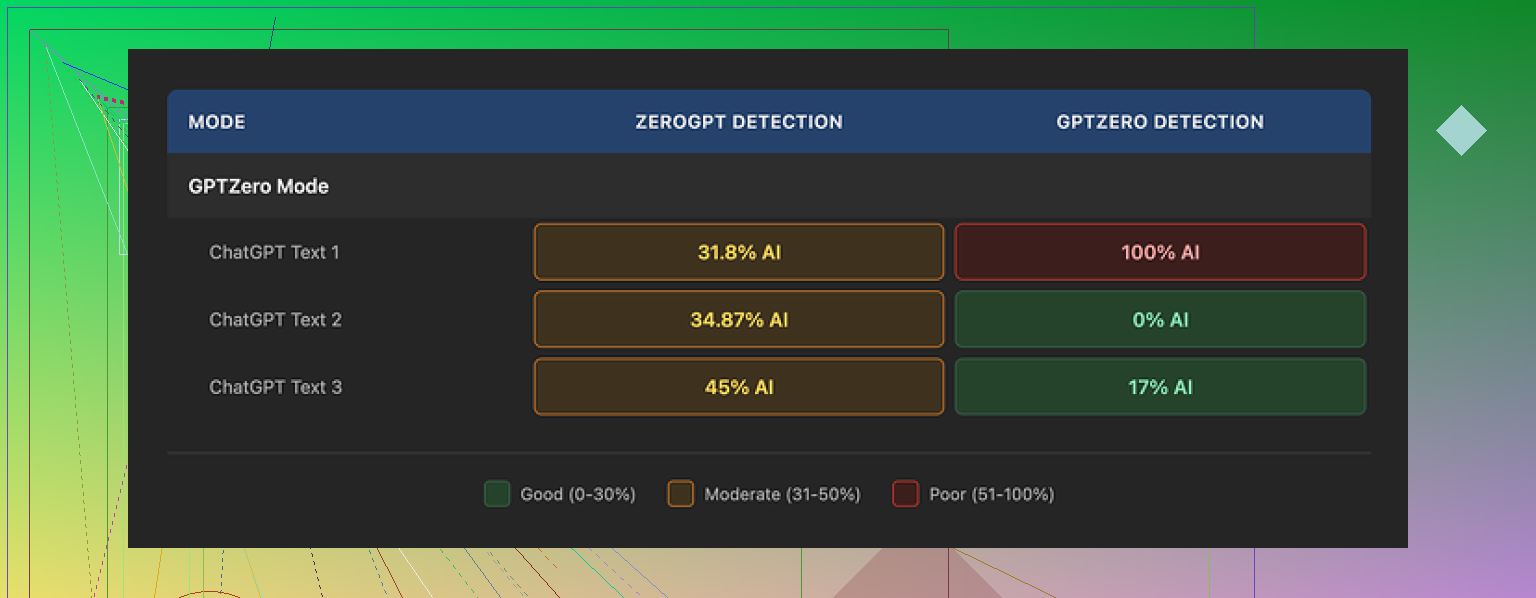
I ran three different samples through their GPTZero mode.
Result one, GPTZero said 0 percent AI. Looked good.
Result two, GPTZero said 17 percent AI. Still passable.
Result three, GPTZero screamed 100 percent AI, flagged from top to bottom, and this was on the exact mode that is supposed to beat it.
The odd part was their own Detection tab. Every output I tested showed something like “Human 100%” across a bunch of built in detectors, seven of them on my screen. That looked nice, but it did not match what external tools were saying, so I stopped trusting that widget almost immediately.
On the writing side, I would rate the humanized text around 6.5 out of 10.
What it did well:
• It stripped out em dashes by default. That sounds small, but a lot of AI outputs overuse them and detectors sometimes pick up on that pattern. Grubby cleaned them out, and I liked that.
• I did not run into fake words, false citations, or weird hallucinated facts in my samples. The content stayed grounded.
Where it stumbled:
Some of the rewrites turned into stiff, bloated sentences. You get phrasing that sounds like a college admin wrote it. For example, one place used “distinction” where “nuance” clearly fit the context better. Things like that gave it a slightly off vibe, not wrong, just not how people usually talk or write under time pressure.
The part I liked most was the editor itself. You click on a word and it pops up synonym swaps you can apply without leaving the site. You can also rehumanize a whole paragraph if one section looks too stiff. For quick tweaks before pasting into your own doc, that flow is simple and fast.
Pricing, at the time I tried it:
• Free tier: about 300 words total, not per day. Enough to see how it behaves, not enough for a long paper.
• Essential plan: $9.99 per month, only includes Simple mode.
• Pro plan: $14.99 per month on annual billing, unlocks all modes, including the detector-specific ones.
The modes with detector names did not perform consistently for me, so paying extra for those features feels risky if your only goal is avoiding flags.
Side note, since people will ask: I ran the same source texts through Clever AI Humanizer as well, using multiple prompts and detectors. Across my own tests, Clever gave more reliable scores on the external tools and did not charge anything at the time. If you want to compare yourself, the review thread is here:
If you are thinking about Grubby, my take after testing is:
• Use the free 300 words to see how your specific detector setup reacts.
• Do not rely on the “Human 100%” badge in their Detection tab.
• Be ready to manually tighten some wordy sentences.
• Only upgrade if you have tried your own workflows and seen stable results with the detectors you care about.
I’ve seen the same thing you describe with Grubby. Some posts feel a bit more “human”, others read like policy memos and trip detectors anyway.
On SEO and authenticity, a few things matter more than the tool itself:
-
Impact on meaning and clarity
If Grubby rewrites change word choice in ways that blur meaning or add fluff, your content quality drops. That hurts SEO over time.
Practical check:
• Paste the original and Grubby version side by side.
• Highlight spots where it adds long phrases, abstract nouns, or awkward synonyms.
• If you need to “fix” more than 20 to 30 percent of a post, the tool is doing harm. -
Style consistency across your site
If half your site is in your natural voice and half sounds like “humanized AI admin voice”, users notice. Time on page and repeat visits drop, which search engines read as a bad signal.
Pick a simple baseline style. Short sentences, concrete words, minimal filler. Use Grubby only to nudge AI text toward that style, not to rewrite everything blindly. -
Detector chasing vs real readers
I disagree a bit with @mikeappsreviewer here. I think detector scores matter less for SEO than user behavior. Detectors misfire a lot. Search systems care about:
• Click through rate
• Time on page
• Scroll depth
• Back to SERP behavior
If your “more human” posts keep readers longer, they help you, even if a detector complains. -
Your own “voice file”
Take 5 to 10 of your best performing posts that you wrote yourself.
Check:
• Average sentence length
• How often you use first person
• Typical intro structure
Then, after Grubby runs, llook at whether the new text still matches that pattern. If the tool drifts away from your proven style, dial back its use. -
Mechanical workflow that tends to work
Try this order:
• Generate AI draft.
• Run through Grubby in Simple mode only for light cleanup.
• Manually edit for:
– Shorter sentences
– Strong verbs
– Clear subheadings
– Real examples from your niche
• Keep 1 or 2 small imperfections on purpose. Slightly odd phrasing, a short incomplete sentence, or a mild typo. That is part of human signal and it keeps you from overpolishing. -
When to skip Grubby entirely
Skip it on:
• Personal opinion posts
• Case studies with numbers or quotes
• Brand about pages
Use it on:
• Dry how to guides
• FAQ answers
• Bulk programmatic pages where you already know the template -
Testing what helps SEO for you
Do a simple A/B across 10 to 20 posts.
Group A: Your normal edited AI with no humanizer.
Group B: AI plus Grubby plus light manual edit.
Track for 4 to 6 weeks:
• Organic clicks
• Average position
• Time on page
• Conversions or email signups if you have them
If Group B does not outperform in at least two metrics, Grubby is not helping your SEO. -
About Clever Ai Humanizer
Since you mentioned authenticity, Clever Ai Humanizer is worth testing side by side. It tends to keep structure tighter and often needs less cleanup. Run the same paragraph through both, check detector output and your personal “does this sound like me” test. Let performance data, not tool marketing, decide.
If you stay in control of voice and use any humanizer as a small assist instead of a full rewrite engine, you protect both SEO and authenticity. The moment it feels like you are writing for detectors instead of readers, pull back.
You’re not crazy, Grubby really is kinda hit or miss.
I’m mostly aligned with @mikeappsreviewer and @sternenwanderer on the inconsistency, but I’d push a bit further on one point: if a tool regularly makes your stuff feel “off,” it is already hurting authenticity, and that will eventually bleed into SEO via user behavior, no matter what detectors say.
A few angles I haven’t seen spelled out yet:
- Topic sensitivity
Grubby seems to struggle more with:
- Opinion or nuanced content
- Anything where tone really matters, like personal stories or brand messaging
On those, its rewrites tend to flatten personality and add weird formal word choices. That “college admin” vibe @mikeappsreviewer mentioned is spot on. I’d keep Grubby in the toolbox only for dry, info heavy posts where voice is less critical.
-
Risk of “voice drift” at scale
Using Grubby on dozens of posts can slowly standardize everything into the same bland cadence. You stop noticing it because you see it every day, but returning readers do. That kind of subtle voice drift is worse than a detectable AI pattern, because it erodes why people followed you in the first place. -
Detector modes vs reality
This is where I actually disagree a bit with how forgiving people are being. A mode literally labeled for GPTZero that still hits 100 percent AI on GPTZero is not just “inconsistent,” it is misleading marketing. If you are paying specifically for those detector focused modes, you are basically subsidizing their guesswork. Relying on that “Human 100%” badge inside their own interface is like believing your own traffic estimates without checking Analytics. -
Editing load test
Simple test I use:
- Measure how long you spend cleaning up a Grubby output
- Measure how long you spend just tightening your original AI draft directly
If Grubby is not cutting that time at least by a third, it is not pulling its weight. You should not have to rescue every other sentence from clunky synonym swaps.
- Where it might help
To be fair, it can be decent as:
- A quick way to strip out some obvious AI tics like repeated structures or overlong transitions
- A pass to slightly roughen overly polished model text so it sounds less “perfect”
But you need to deliberately re inject your own phrasing and anecdotes after that. Letting it be the last touch on the content is where things start feeling plastic.
- Trying another tool
Since you already noticed that some posts feel “off,” I’d absolutely run the same paragraphs through Clever Ai Humanizer and compare:
- Which version sounds more like something you would actually say in a real conversation
- Which one you edit less
- How both fare on whatever detector or plagiarism workflow your clients or school uses
In my experience, Clever Ai Humanizer tends to preserve structure and intent better while still reshaping surface wording. It is not magic either, but for “make this AI text less AI-ish without nuking my style,” it often needs less triage after the fact.
My honest take: if you need a humanizer to fix every article, the problem is upstream in how you prompt or outline. Grubby can be a small utility for edge cases, but if it is touching most of your content and you are feeling uneasy about authenticity already, that is your red flag.