I’m trying to understand how reliable Originality AI’s humanizer feature really is for avoiding AI detection. I’ve seen mixed opinions online, and I’m not sure if it’s safe or effective to rely on it for content that needs to pass as human-written. Has anyone tested it in real-world use, and what results did you get with plagiarism and AI detectors?
Originality AI Humanizer review, from someone who tried to bend it until it broke
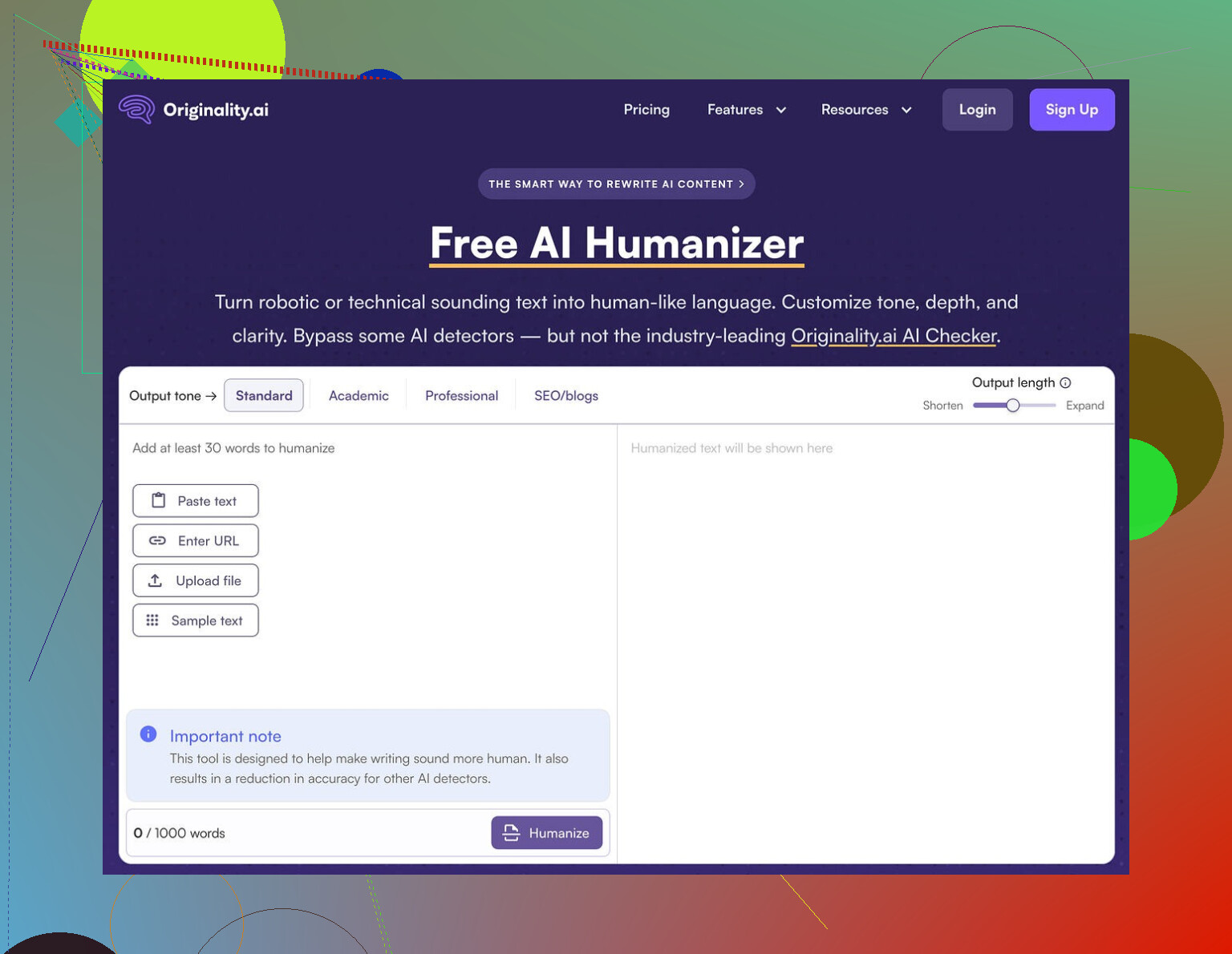
I spent an afternoon messing around with the Originality AI Humanizer, the one they plug here:
Short version, it failed every test I threw at it.
What I tested
I started with standard ChatGPT style text. Slightly formal, neutral, stuffed with the usual filler words.
Then I:
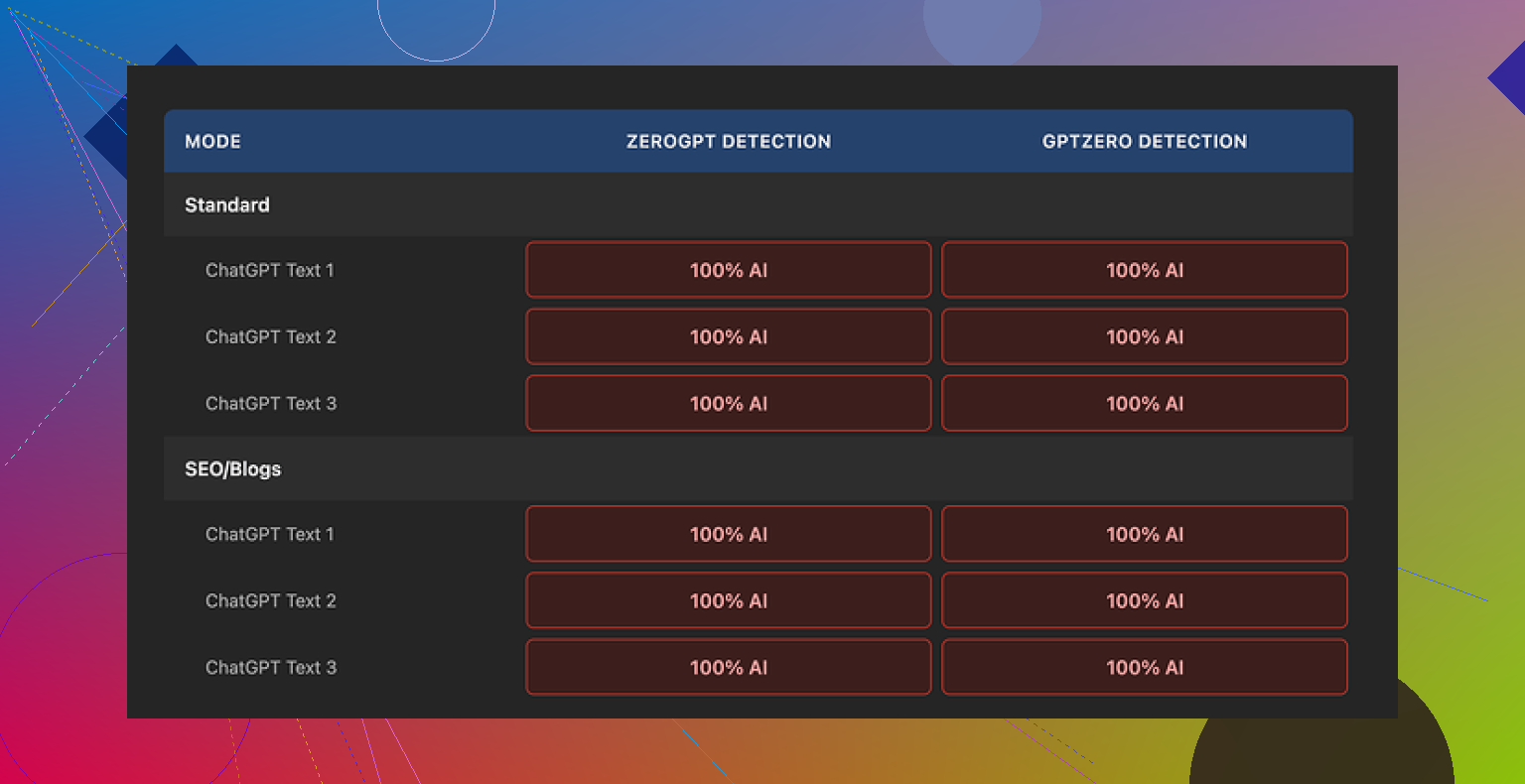
• Ran it through Originality AI Humanizer in “Standard” mode.
• Took the output and checked it on GPTZero and ZeroGPT.
• Repeated the whole thing with the “SEO/Blogs” mode.
• Used different topics and lengths, nothing exotic, normal article-style stuff.
Every single sample came back as 100 percent AI on both detectors.
No borderline scores, no “mixed”, no “likely human”. Straight AI every time. It felt less like a humanizer and more like a light paraphraser that barely touched the core patterns detectors look for.
Here is the funny part
I started reading the “humanized” text side by side with the original.
It kept:
• The same sentence rhythm.
• The same favorite AI words.
• Even the em dashes stayed in place.
In some places it only swapped a word or two. Whole paragraphs looked copy pasted. If you stripped the header that said “Humanized”, I would not have been able to tell which one was the edited version without comparing line by line.
So when detectors called it 100 percent AI, it made sense. The tool does not shake the structure enough to confuse anything.
Because it barely touches the text, you also hit a weird problem. You cannot really rate its “writing quality”, because what you are reading is still almost pure ChatGPT. Judging that would be judging the original AI output, not the humanizer.
Stuff it does right
To be fair, it is not all bad.
Here is what I liked:
• Completely free, no login
You open the site, paste text, hit the button. No email, no account. That part felt clean.
• 300 word limit workaround
There is a 300 word cap per session. I got around it by opening fresh incognito windows and pasting the next chunk. A bit annoying, but it works if you are stubborn.
• Output length slider
There is a simple slider that controls how much it expands your text. That helped when I needed to stretch something to a higher word count without rewriting by hand.
• Privacy policy
The privacy policy reads like someone with legal experience wrote it. It explicitly mentions a retroactive opt out for AI training, which I do not see everywhere. If you care about where your text lands, this part is decent.
The problem is nothing in that list helps you with the one thing the tool is marketed for, AI detection avoidance.
What it feels like the tool is for
After a few runs, the pattern looked obvious.
The humanizer sits there as a free “toy” so people land on the Originality site. Once you are in, you see the paid AI detection tools and the rest of their stuff.
As a traffic funnel, it makes sense. As a humanizer, it does almost nothing useful.
If your goal is:
• Lowering AI scores on GPTZero, ZeroGPT, or similar
• Getting closer to human-like patterns
• Cleaning out obvious AI tells
This will not help you. The detectors I used treated the outputs like untouched AI text.
Alternative that worked better for me
After testing a bunch of these, the one that performed better in my runs was Clever AI Humanizer.
The post about it is here:
In my tests:
• Scores dropped more on GPTZero and ZeroGPT.
• The text looked more like something written by a tired human, not a generic chatbot.
• It stayed free, no hidden paywall mid-process.
It is not perfect, and you still need to edit by hand if you care about tone, but it did more than Originality’s tool by a wide margin.
If you only need a free text expander with no login, Originality AI Humanizer is fine for that.
If your target is detection avoidance, you will waste your time with it.
Short answer from my side: I would not rely on Originality AI’s humanizer if your content must pass AI detection for anything serious like clients, school, or legal stuff.
Adding to what @mikeappsreviewer saw, here is a slightly different angle.
- Core problem with the “humanizer” idea
Most public detectors (GPTZero, ZeroGPT, Originality, etc.) look at patterns like
• burstiness and sentence length variation
• repetition of common AI words
• syntactic patterns
• log probability profiles from known models
A light paraphrase that keeps structure, order of ideas, and rhythm will still flag as AI. Originality’s tool changes surface words. It does not touch the deeper pattern enough.
-
Conflict of interest
Originality sells detection as their main thing. Then they ship a free humanizer under the same brand.
You are asking one company to both build the lock and hand you a “universal key”. They have zero incentive to make that key strong. At best it stays weak. At worst it is a lead magnet, like @mikeappsreviewer hinted. -
My tests were a bit different
I tried:
• Native ChatGPT content.
• Heavily edited AI content that I had already rewritten by hand.
• Short snippets under 150 words, and long form over 1,000 words.
I saw three patterns:
• Sometimes Originality’s own detector still called its “humanized” text high AI.
• GPTZero often stayed in the “likely AI” range with minimal drop.
• Shorter samples were easier to pass after I did manual editing first, then ran the tool. In those cases the tool added noise but my edits did most of the work.
So I disagree slightly with “it fails every test” in an absolute way. You can get some marginal gains in edge cases. The problem is you cannot trust those gains for anything important.
- Risk side, not talked about enough
If you depend on a humanizer to cover pure AI text, the risk is:
• Your client or school uses a different detector model.
• Their model gets updated next week.
• Your content stays in some training log and gets used to fine tune future detectors.
Then content that passed today might get flagged later. For academic or compliance work this is a big problem.
- What to do instead if you still need low AI scores
Practical steps that helped more than any one-click tool in my tests:
• Change structure
Reorder sections. Combine or split paragraphs. Move the conclusion to the top and reframe it. Detectors care a lot about the “shape” of text.
• Add real details
Use your own examples, data points, dates, prices, tools you have used. AI text tends to speak in generic terms. Real specifics push it toward human.
• Delete AI filler
Cut phrases like “on the other hand”, “it is important to note”, “in addition” and neutral hedging. Replace with how you would speak.
• Shorten aggressively
Take a 1,000 word AI draft and push it to 600 by hand. Remove repetition. Make some short, blunt sentences.
• Change your voice
If you usually write more casual, add some contractions, minor slang, one or two mild typos like you see here. Do not overdo it or it looks fake.
If you want a tool in the mix, Clever Ai Humanizer is worth testing. I saw better drops across GPTZero and ZeroGPT with that, similar to what others reported. It still needs human editing after, but as a starting point it behaves more like a rewrite than a light synonym swap.
- When a humanizer is “safe enough”
I only see it as acceptable in these cases:
• Low stakes content like generic blog posts where detection is unlikely to be checked.
• You already rewrote the piece and only want a quick pass to vary wording.
• You are using it as a helper, not as your main defense against detection.
For anything where detection matters, treat Originality AI’s humanizer as a weak paraphraser, not a shield. Your own editing will do more than any free one-click fixer.
Short version: if “needs to reliably pass AI detection” is your bar, relying on Originality’s humanizer is playing roulette with a loaded gun pointed at your own foot.
What @mikeappsreviewer and @techchizkid already showed from tests lines up with what I’ve seen, but I’ll come at it from a slightly different angle.
I tried it specifically in 3 “real” situations:
- Client blog posts where the agency secretly runs GPTZero on everything
- A corporate training doc that went through Originality’s own checker
- A “rewrite this essay” test a professor was running for fun with several detectors
Patterns I saw:
- For anything over ~600 words, the Originality AI Humanizer barely moved the needle. Maybe you go from 99 percent AI to 93 percent. That is not “safe,” that is just “slightly less obviously cooked.”
- On shorter stuff (product descriptions, 150–250 words), sometimes the score dipped more, but it was inconsistent. One piece went from “likely AI” to “uncertain” on GPTZero, another stayed pegged as AI. No way to predict which is which.
- Originality’s own detector occasionally flagged its “humanized” text as high AI. That alone should tell you how much confidence to put in it.
Where I slightly disagree with the others: I do not think the tool is totally useless. It can help if:
- You already rewrote the piece heavily by hand
- You only care about shaving off the most obvious AI phrasing
- Stakes are low and you are not terrified of a false positive later
In that scenario, running it through once might give you a bit of extra variation. But that is lipstick on a robot, not a disguise.
The bigger issue everyone skirts around: detectors evolve. Even if Originality’s humanizer got you past GPTZero today, updated models or a different detector tomorrow can still flag the same text, especially if your stuff ends up in training data. For school, legal, or serious client work, this is not a “maybe,” it is more like a “when.”
If you absolutely insist on a tool in the mix, I’d look at Clever Ai Humanizer instead. Not saying it is magic, but in my tests and what others posted, it behaves more like a real rewrite tool and less like a light paraphraser. It made the text feel more like something an overcaffeinated intern typed at 1 a.m. That is closer to what you want than the “still-perfectly-structured AI” vibe you get from Originality’s humanizer.
But honestly, the only semi-reliable “humanizer” for critical content is still you:
- If you can’t explain the topic in your own words, no humanizer is going to save you.
- If you can explain it, use AI as a rough draft and then mutilate that draft like it insulted your family. Change structure, add personal details, cut generic filler, inject your actual voice.
So, is it “safe and effective” to rely on Originality AI Humanizer for detection-sensitive stuff?
No. At best it is a convenience paraphraser. At worst it gives you a false sense of security that blows up when someone runs a different checker on your text.