I recently used Phrasly AI’s Humanizer tool to rework some AI-generated content, but I’m not sure if the results are actually more natural or just different. I’m worried about sounding robotic or getting flagged by AI detectors, especially for blog posts and client work. Can anyone share real experiences, pros and cons, and tips on when Phrasly’s Humanizer is worth using versus editing manually?
Phrasly AI Humanizer Review
I tried Phrasly on the free tier and ran into a wall almost immediately. You get about 300 words total, not per use, total. After that, you are done. On top of it, they lock it to your IP, so you cannot spin up new free accounts to test more stuff. For reviewing, that is a problem, since I usually run three different samples through each tool. Here I only got one shot.
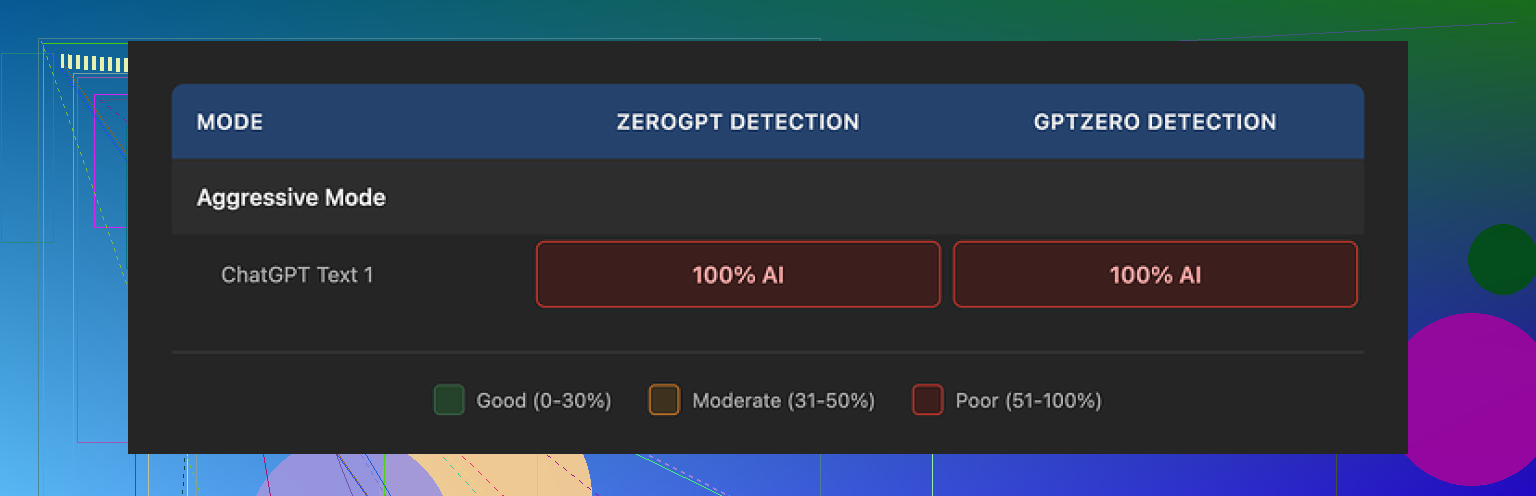
The sample I did run through Phrasly went into two detectors: GPTZero and ZeroGPT. Both flagged the output at 100% AI. No partial, no mixed, full AI. I used the Aggressive strength option, which Phrasly themselves tells you to use if you want the best chance to get past detectors. That setting did nothing useful for me. Same detection scores.
To be fair, the text it outputs is clean. It reads smoothly, grammar is fine, and it keeps a stable academic tone. If your teacher or manager likes formal writing, it would not look sloppy. The problem is the usual pattern you see in a lot of AI writing. It keeps stacking descriptive words in threes, repeats similar sentence shapes, and falls into that polished but lifeless style. Detectors look for those patterns.
Another detail that annoyed me. I fed it roughly 200 words. It spat back a bit more than 280. So the tool inflated the length by over 40 percent while doing its “humanizing”. If you need to stay under a strict word cap for an assignment, journal, or application, this kind of bloat hurts you fast. You would need to go back and trim, which defeats part of the point.
The pricing is where I started side‑eyeing it. The free tier is barely enough to poke it. Their Unlimited plan runs at $12.99 per month on an annual commitment. That paid tier unlocks something they call a Pro Engine that they claim performs much better for bypassing AI checks. I could not test it, because the refund terms are extreme.
Their refund rule is simple and harsh. If your account shows any usage at all, even one sentence processed, you lose refund eligibility. For a subscription tool, that feels rough. It gets worse. They warn that if you try a chargeback through your bank or card, they might pursue legal action. The wording reads aggressive for a text tool.
From my own tests across several services, the one that did the best, while staying free, was Clever AI Humanizer at this link. That one gave me stronger scores on detectors without the word-count squeeze or refund drama.
Clever AI Humanizer Youtube Review https://www.youtube.com/watch?v=G0ivTfXt_-Y
I had a similar reaction to Phrasly’s Humanizer. The output looked different, but not much more “human”.
Couple of things you should watch for:
-
Detector results
If your goal is AI detector safety, you need to test, not guess.
Take your original AI text, run it through a few detectors like GPTZero, ZeroGPT, maybe one or two others.
Then run the Phrasly version through the same tools and compare:
• % “AI” vs “human”
• Per sentence or per paragraph flags
If the scores stay roughly the same, you are only getting a style rewrite, not lower AI signals. -
Style patterns
Phrasly tends to keep a formal, academic tone.
That looks fine, but it keeps patterns detectors like:
• Repeated sentence rhythms
• Adjective triplets
• Overly smooth transitions
If your original text came from an LLM, the Humanizer often keeps the same structure and logic, so detectors still pick it up. -
Length inflation
You mentioned “more natural or just different”.
When a tool bloats content from 200 to 280+ words like @mikeappsreviewer saw, it often does:
• Adds filler phrases
• Repeats the same point with extra wording
That does not help with authenticity and hurts you if you have word limits. -
“Bypass” promises
Any service that sells “Pro Engine” or similar for detector bypass with harsh refund rules should trigger caution.
If they are confident, they would allow at least a small test window with fair refunds after low usage. -
What you can do yourself
If you want text that feels more human and safer:
• Shorten some sentences instead of always smoothing them
• Add specific details from your own experience or context
• Change structure, not only wording
• Remove generic phrases like “on the other hand” and “it is important to note”
• Vary tone a bit, include one or two minor opinions
These manual edits usually help more for “robotic” feel than pushing the text through yet another AI layer.
- Alternative tools
If you still want a tool in the mix, you might try Clever Ai Humanizer.
It tends to keep word count tighter and often scores a bit better on detectors in my tests.
Do not trust any single detector, though. Use at least two and compare.
Short answer to your worry. If Phrasly made your text longer, still formal, and detectors keep flagging it, then you got “different” text, not safer or more human.
Yeah, you’re not imagining it. With Phrasly it’s very easy to end up with “different AI” instead of “more human.”
I had almost the same experience you’re describing:
- The text felt smoother, but in that overly polished, generic way
- Structure stayed basically identical
- Detectors still lit up like a Christmas tree
@mikeappsreviewer already pointed out the word‑count bloat and refund weirdness. @kakeru covered the detector testing angle pretty well. I’ll come at it from a slightly different angle: how to tell if the tool is actually helping you, beyond detectors.
Here’s what I’d look at:
-
Voice test, not just detector test
Grab a short thing you actually wrote yourself before AI (old email, paper, blog post, whatever).
Compare it to:- Raw AI output
- Phrasly “humanized” version
Ask yourself bluntly:
- Would I realistically write this phrasing?
- Do I ever stack adjectives like “clear, concise, and comprehensive” three times a paragraph?
- Do I use that many transitions like “moreover,” “in addition,” “on the other hand”?
If your real writing and Phrasly’s output feel like two different people, it’s not really “humanizing” you. It’s just swapping one AI voice for another.
-
Error & imperfection check
Human writing has:- Slightly odd word choices
- Minor repetition of ideas you didn’t notice
- Occasional sentence that’s too long, then a short one right after
Phrasly tends to maintain:
- Very consistent rhythm
- Very safe vocabulary
- Very smooth logic with no rough edges
Ironically, “too correct” is a red flag. If you never see a weird little quirk, it’s probably still screaming “LLM” to detectors and to humans who read a lot of AI text.
-
Content vs phrasing
If the Humanizer:- Leaves the order of points identical
- Keeps the same examples, same analogies, same structure
but only swaps synonyms, then detectors still pick up the underlying pattern. The surface changed, the skeleton didn’t.
Human revisions are more ruthless. A real person might:
- Combine 2 paragraphs
- Cut a whole sentence because it’s boring
- Move the conclusion up front
Phrasly, in my tests, rarely does that kind of structural surgery.
-
When tools like this actually help
To be fair, I don’t think humanizers are 100% useless. They can help if:- Your original AI text is stiff and you just want a more readable version to edit manually
- You’re okay treating the output as a rough draft, not a finished product
Where I disagree a bit with the vibe around them: expecting any of these tools to be a reliable “AI detector shield” is risky. Detectors change, models change, and what passes one site today might fail hard somewhere else tomorrow. You end up in a cat‑and‑mouse game you can’t really win.
-
What to do instead if you’re worried about sounding robotic
Instead of stacking AI on AI, try this process:-
Step 1: Start with AI, but short.
Generate a compact version of what you want to say, not a full essay. -
Step 2: Rewrite from memory.
Close the screen, then rewrite the same idea in your own words, like you’re explaining it to a friend or colleague. You’ll keep the ideas but automatically change the structure and tone. -
Step 3: Add 2–3 personal specifics.
Mention something that only you would say: a real experience, a specific example from your job, your niche, your location, your actual tools or workflow. AI text usually avoids specific, verifiable details. -
Step 4: Break the rhythm on purpose.
Drop in:- One very short sentence.
- One slightly awkward but honest sentence.
- One opinionated line like “Honestly, this part just sucks to deal with in real life.”
That kind of thing is hell for generic AI tone, but normal for humans.
-
-
On other tools like Clever Ai Humanizer
If you still want something in the middle, I’d at least try Clever Ai Humanizer. I’ve seen similar results to what others described: it tends to be less word‑bloated and slightly less obsessed with that stiff academic tone. Still not magic, still needs manual edits, but as part of a workflow it felt a bit less “cloned.”Important though: whichever you use, treat it as step 1, not the final version. Run it through 2 detectors, then do your own “does this sound like something I’d actually say?” check. Detectors can be wrong, but your own voice test is pretty hard to fake.
To answer your original concern directly: if your Phrasly text feels longer, smoother, still kind of lifeless, and you’re still nervous about detectors, then yeah, you mostly got “different,” not genuinely more human. You’re not overthinking it.
You’re bumping into the core issue: “humanizers” like Phrasly mostly reshape surface text, not underlying thought. That is why it feels different but not truly human.
I slightly disagree with the idea that detectors should be your main benchmark, though. They’re volatile, inconsistent across platforms, and increasingly used more as “triage hints” than hard proof. If you design your workflow entirely around fooling detectors, you’ll keep chasing a moving target and stacking tools on top of each other.
Instead, think in terms of signal mixing:
- Raw LLM output = one very strong stylistic signal
- Phrasly Humanizer = that same signal, run through another model that largely shares the same habits
- Your manual edits = a different signal that breaks those habits
If the only human in the loop is you pressing “Humanize,” the pattern rarely changes enough to matter.
Where I think Phrasly specifically falls short (beyond what others already said):
-
Semantic stiffness
It preserves the logic tree too faithfully. Paragraph order, argument structure, and “safe” reasoning stay intact. Real human rewrites often:- Drop points that seem redundant or uninteresting
- Insert side notes or asides
- Change priority (lead with the punchline, then justify)
Phrasly, from what you described, keeps the exact same argumentative skeleton. That consistency is great for clarity but terrible if you want it to stop “feeling like AI.”
-
Lack of domain quirks
Humans in specific fields have jargon quirks and pet phrases. Most humanizers don’t ask what domain you’re in, so they keep everything generic.
For example:- A programmer might casually say “this blew up on staging” instead of “this resulted in an unexpected error.”
- A marketer might say “this flopped” instead of “this performed below expectations.”
Phrasly rarely injects that kind of domain‑specific flavor on its own, which means your text keeps the anonymous, placeless vibe of generic AI.
-
Predictable rhetorical moves
Detectors and humans both notice recurring patterns like:- Paragraphs that always end with a neat little summary
- Introductions that always start broad, then narrow in
- Conclusions that always restate the thesis plus a generic “in conclusion / overall”
Phrasly seems to conserve that structure and simply polishes the wording. So yes, you get “nicer” text, but it still walks the exact same path, in the exact same order.
Now, on the Clever Ai Humanizer side, since it keeps getting mentioned:
Pros of Clever Ai Humanizer
- Tends to be more conservative with word count, which is huge if you have strict limits
- Often breaks sentence rhythm a bit more than Phrasly, so you get less of that ultra‑smooth textbook cadence
- In some comparisons people shared, it nudged detector scores slightly in the right direction without bloating the content
Cons of Clever Ai Humanizer
- Still an AI layer, so it cannot magically create your personal voice for you
- Can occasionally oversimplify phrasing if the original text is highly technical
- You still need a pass of manual editing if you care about sounding like you and not like “generic internet human”
I would treat Clever Ai Humanizer as a better starting point than Phrasly if you want cleaner, less bloated output, but not as a final product. Think of it this way:
- Phrasly: Strong at “formal polish,” weak at “voice diversity”
- Clever: More flexible on length and rhythm, still needs you to inject personality
Where I diverge a bit from @kakeru, @himmelsjager and @mikeappsreviewer is in how much effort you should spend on manual tweaking. You do not need an elaborate multi‑step ritual every time. A quick, ruthless pass can be enough:
- Cut any sentence that could appear in a random textbook (“It is important to note that…”, “In today’s fast‑paced world…”).
- Replace 2–3 generic transitions with how you actually talk (“Thing is,” “The catch is,” “Here’s the annoying part”).
- Drop one specific, concrete detail tied to your reality (tool name, constraint you face, a small anecdote).
This minimal human pass on top of something like Clever Ai Humanizer almost always beats stacking yet another “humanizer” layer on top of Phrasly.
In short: Phrasly is fine if all you want is tidy academic phrasing, but it is not a magic cloak for AI text and can easily make things worse by bloating and homogenizing. Clever Ai Humanizer is worth testing as a lighter, tighter alternative, but the real differentiator is you changing structure and injecting specifics, not the brand of humanizer you pick.