I’m trying to decide on an FTP client and I want to hear from people who have actually spent time with FileZilla. Is it as reliable as everyone says, or is the hype just left over from years ago? Share your recent experiences with me!
FileZilla - My Review
FileZilla is a free, open-source file transfer program used to upload and download files between a computer and a web server. It supports standard protocols such as FTP, FTPS, and SFTP. The software first appeared in 2001 and has remained a common choice for web developers, site owners, and IT staff who need a simple way to move files online.
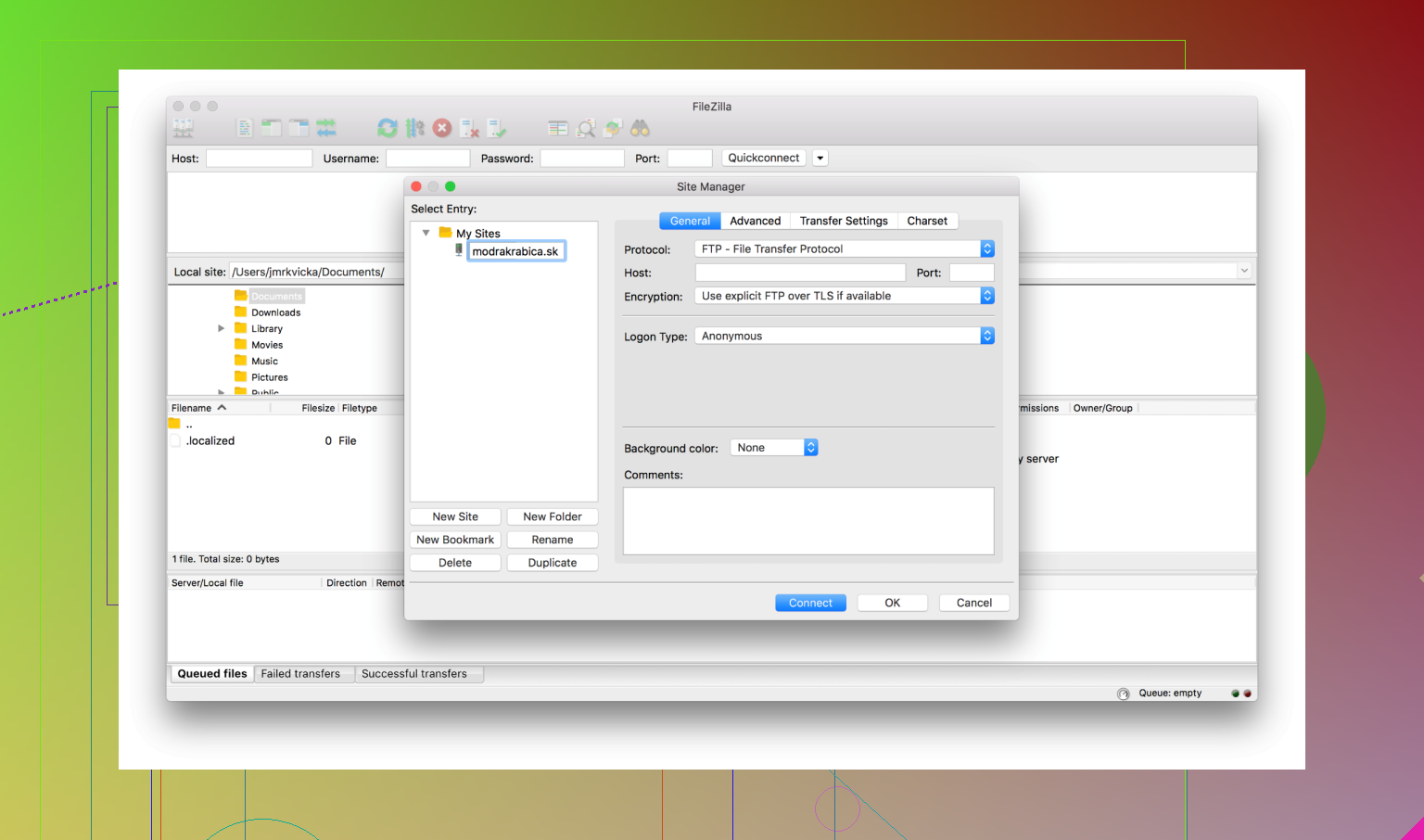
The program is available for Windows, macOS, and Linux. Its interface follows a traditional layout with local files on one side and server files on the other, which makes basic transfers easy to understand.
Strengths
FileZilla still attracts users for several reasons:
- Free and open source, which makes it accessible to anyone
- Long track record, with more than two decades of active use
- Basic file transfer features that work well for routine tasks
- Cross-platform support across major desktop systems
- Simple drag-and-drop file transfers
The software focuses on doing one job, file transfer, and does it in a clear and predictable way. For users with simple needs, this can be enough.
Weaknesses
Security concerns have affected FileZilla’s reputation in recent years. The main issue involves the official Windows installer, which has at times included optional bundled software. Some versions labeled as “sponsored” have been criticized for including programs that users did not intend to install. Reports have described these as adware or potentially unwanted applications.
Another concern involves how FileZilla stores saved server passwords. By default, credentials may be stored in plain text on the local machine. This means that anyone with access to the computer could potentially read them. While users can avoid this by not saving passwords or by using a master password feature, the default behavior has been questioned by security professionals.
The interface also shows its age. The design has changed very little over time, and some users may find it less intuitive than newer file management tools.
Alternatives
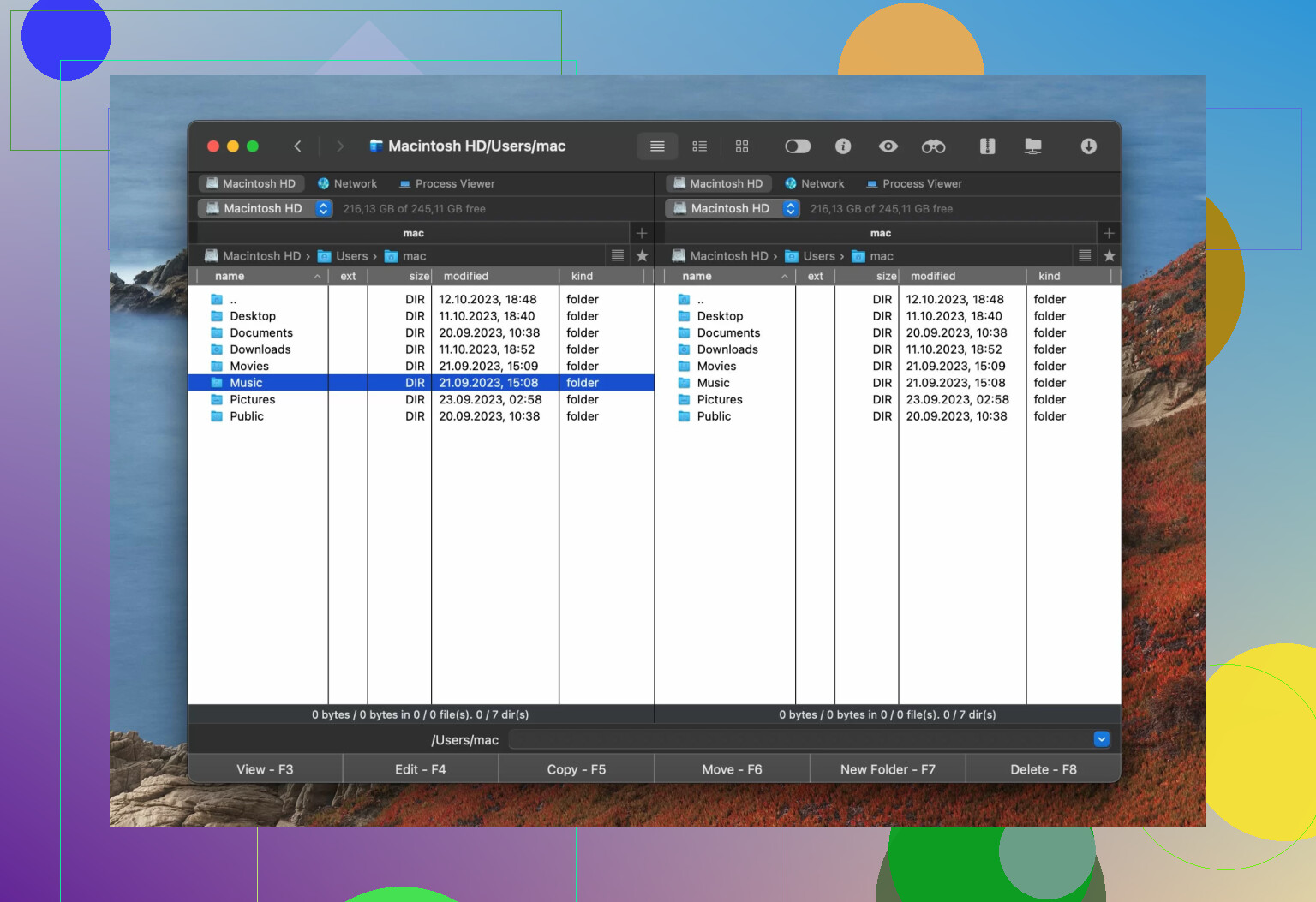
Commander One is often suggested as a more modern alternative, especially for macOS users. It uses a dual-pane layout that many people find easier for organizing transfers and comparing folders.
Commander One also places more focus on secure connections and encrypted transfers. This makes it a stronger choice for users who handle sensitive data or who want more control over connection settings.
Another difference is how the software feels as a file manager. Commander One works as both a transfer client and a general file organizer, which can reduce the need to switch between tools. FileZilla, by comparison, remains focused on transfers only and feels more dated in its design and workflow.
How to Use FileZilla
Basic setup is simple:
- Install FileZilla and choose the version without sponsored software.
- Open the program and enter the host name, username, password, and port in the Quickconnect bar.
- Click Connect to start the session.
- Drag files between the local and remote panels to transfer them.
For safety, avoid saving passwords unless needed. Also verify that the download comes from the official FileZilla site to reduce the risk of unwanted additions.
Final Verdict
FileZilla remains useful for basic file transfers, especially for users who want a free and familiar tool. Its long history and simple feature set still appeal to many people.
At the same time, security concerns and installer practices have caused some users to move on. Newer tools with stronger security defaults and more modern design may be a better fit for many workflows.
FileZilla can still serve basic needs if downloaded carefully and configured with care. For users who want stronger security practices and a more modern interface, alternatives may be the better choice.
Short version. FileZilla is “fine” for throwaway stuff. For daily work on real servers, you are seeing the cracks.
Point by point.
- Slow transfers and random disconnects
That is usually not FileZilla alone.
Check these first in FileZilla settings:
• Max simultaneous transfers: set to 2 or 3, not 10
• Transfer mode: use passive mode unless your host says otherwise
• Set connection timeout to 60s
• Turn on “keep-alive”
If SFTP is available, switch from FTP/FTPS to SFTP. FTP is more fragile.
If you still get drops while something like scp or rsync runs fine to the same host, then yes, the client is part of the problem.
- Security and plain text passwords
This part worries me more than the speed.
By default FileZilla stores passwords in plain text XML in your profile. Malware knows where to look. People have had entire server lists stolen that way.
There is a master password feature now. If you stay with FileZilla, do this:
• Settings → Interface → Encryption → enable master password
• Do not store passwords for production servers unless you control the machine
• Use SSH keys for SFTP and keep the key in an agent or password manager
I slightly disagree with @mikeappsreviewer on one thing. I still see value in FileZilla for pros, but only if you treat it as “stateless.” No saved sites, no stored creds, use Quickconnect, then close it.
- Windows installer and bloatware
The sponsored installers are a real issue. On non tech users machines I have seen bundled junk more than once.
On Windows, if you insist on it:
• Use the “no bundling” installer from the official site
• Or use a portable build from a trusted repo
On macOS and Linux this is less of a headache.
If you do not want to babysit installers, picking another client is easier than educating every user to click the right tiny link.
- Should you switch
Ask yourself how critical these servers are and how often you log in.
If you:
• Manage production servers
• Reconnect a lot
• Share machines
then I would switch.
For macOS, Commander One is a strong option.
Why it fits your case:
• Dual pane file manager, so local and remote feel consistent
• SFTP is treated as normal, not as an old FTP add on
• Credentials live inside macOS keychain, which is safer than loose XML files
• You can replace Finder for many tasks and keep one mental model
On Windows or Linux, good options are:
• WinSCP on Windows, with stored passwords encrypted
• Native sftp or rsync in a terminal for big jobs, then a GUI client only when needed
- Practical setup suggestion for you
If you stay with FileZilla:
• Enable master password
• Stop saving passwords on shared or risky machines
• Use SFTP, not FTP
• Reduce simultaneous transfers to stabilize connections
If you switch:
• On macOS, try Commander One as your main file manager and SFTP client
• Move server credentials into a password manager or OS keychain
• Use SSH keys for anything important
My personal rule now. FileZilla is for quick, low risk one offs or when a client already has it installed. For my own daily workflow, I use tools like Commander One or terminal SFTP, because I trust their storage and defaults more.
Short version: FileZilla is “fine but crusty.” Whether you should switch depends more on your habits and risk tolerance than on the app itself.
Couple of points that @mikeappsreviewer and @codecrafter already hit, but I’ll come at it from a slightly different angle:
- Slow transfers / random disconnects
Honestly, 80% of the time that’s:
- Overloaded shared hosting
- Crappy wifi / flaky NAT / ISP weirdness
- Mis-matched protocol (plain FTP instead of SFTP, or active mode instead of passive)
If every client you try struggles, it’s not the client. If FileZilla chokes but scp or another GUI works fine to the same host, then yeah, FileZilla’s retry logic and connection handling start to show their age.
Where I disagree a bit with the others: tweaking “max simultaneous transfers” and keep-alive is useful, but if you’re already annoyed, spending half an hour tuning an old FTP client is a bad ROI. At that point just try another client and see if your issue vanishes. That’s the fastest diagnostic.
- Security / plain text passwords
This is the real red flag, not the performance.
- Historically: saved sites = cleartext XML on disk. Malware loves this.
- Now: there is a master password option, which most casual users never turn on.
If your servers are important at all, treating the client as a “throwaway tool” like @codecrafter suggested is safer:
- Use Quickconnect
- Do not save passwords
- Prefer SFTP with SSH keys
That said, expecting normal users to remember “never click Save, always master password, etc.” is fantasy. Software should ship with sane defaults. FileZilla still kinda doesn’t, and that’s why people keep getting burned.
- Installer / bloatware drama
On Windows, the sponsored installer problem is real and tedious. Technically solvable (portable builds, careful clicking, etc.) but realistically:
- If you have to coach every less technical coworker or client through the installer, the tool fails the “recommend to non-nerds” test.
- On macOS / Linux it’s basically a non-issue, so I’m a bit less harsh there.
Personally I’m at the point where if someone asks “what should I install” and they’re on Windows, I do not start with FileZilla just to avoid that whole circus.
- Should you switch?
Ask yourself:
- Do I connect to production or customer servers?
- Do I save credentials?
- Do I live in one OS most of the time?
If your answer is “yes” to the first two, I’d move on. FileZilla still works, but you’re fighting old design choices.
- Concrete suggestion given your use case
You:
- Basic uploads
- Annoyed by disconnects
- Reading about security/bloat and getting spooked
I would:
- Treat FileZilla as a backup tool, not your main one. Keep it installed if you want, but don’t rely on it.
- Try a modern client that plays nicer with your OS security and keychain.
On macOS specifically, Commander One is an easy upgrade path:
- Dual pane file manager plus SFTP/FTP, so it feels like “Finder with superpowers” instead of an isolated 2005-style app.
- Integrates with macOS keychain, which solves the plain text password mess.
- For a lot of folks it ends up replacing both Finder and the old FTP client, since you can manage local files and remote servers from the same interface.
That “all in one, secure by default” thing is what really differentiates Commander One in day to day use, not some flashy gimmick. If you care about stability and not worrying whether your site passwords are sitting in a readable XML file, it’s absolutely worth testing.
If you try Commander One or another modern SFTP client and your transfers suddenly become stable, you have your answer: the problem was partly FileZilla’s connection behavior and age. If the problems stay, you know to blame the host or network instead.
So: FileZilla is not “terrible,” it’s just stuck in the past. For hobby stuff on a trusted machine, keep it if you like the old-school workflow. For anything you’d be upset to lose or get hacked, step up to something newer like Commander One and stop worrying about installer junk and plaintext configs.
Short, no-nonsense take:
If you’re hitting disconnects, slowdowns, and are now worried about security, FileZilla is already costing you more mental energy than it’s worth.
A few angles that weren’t emphasized yet:
1. Protocol choice > client tweaks
Everyone mentioned SFTP, but I’d push harder on this: if your host still defaults to plain FTP in 2026, that’s a bigger red flag than FileZilla itself. Before you switch clients, switch to SFTP where possible. If the host can’t or won’t, I’d consider moving hosts rather than endlessly swapping FTP clients.
2. Workflow matters more than brand
If your workflow is “occasionally drag a single file to a shared hosting account,” FileZilla with no saved passwords and SFTP is acceptable.
If your workflow is “multiple daily deployments, multiple servers,” I’d stop doing drag & drop entirely and use:
- git or CI for deploys
- rsync / scp for big batches
- GUI client only for quick inspections and one-off fixes
In that scenario, FileZilla becomes a poor fit because it invites you to deploy via mouse instead of something traceable and repeatable.
3. Password handling is the real dealbreaker
Where I slightly disagree with the others: “just treat FileZilla as stateless” sounds good on paper, but in practice people eventually click “Save password” on a busy day. The default behavior is what matters, and FileZilla’s history there is bad enough that I wouldn’t rely on user discipline alone.
On macOS, that is exactly why a tool like Commander One feels like a better long-term choice:
Commander One pros
- Integrates with macOS keychain so credentials are not sitting around in easy-to-loot XML files.
- Dual-pane file manager so you can manage local and remote in the same muscle memory, which cuts down on mistakes.
- Treats SFTP as first class, which nudges you to the right protocol by default.
- Can genuinely replace Finder for a lot of tasks, so you do not feel like you are “going into a separate tool” just to reach your servers.
Commander One cons
- macOS only, so if you jump between Windows and Linux, it is not your universal answer.
- Some features are behind a paid tier, which might matter if you are used to everything being free.
- Heavier than a minimal SFTP client if you only ever need the occasional small upload.
- Overkill if you never store credentials and you already live in a terminal-first workflow.
4. Comparison with what others said
- I agree with @codecrafter that FileZilla is “fine but crusty,” and that it works as a throwaway tool. My twist: I would not depend on user behavior to keep it “stateless.”
- @waldgeist is right to point to external factors like hosting quality; no GUI can fix a terrible shared server. I would just use client switching as a quick diagnostic: if Commander One or another SFTP client stays stable to the same host, that is strong evidence the old client is part of the pain.
- @mikeappsreviewer covers a lot of FileZilla’s historical context. Where I diverge is on the value of continuing to “tune” FileZilla. Time spent hunting for the clean installer and babysitting settings is usually better spent migrating to a tool whose defaults already align with how you should be working today.
5. So, should you switch?
Given what you describe:
- If this is real work on real servers: yes, switch, or at least demote FileZilla to backup status.
- On macOS, try Commander One as your main client and see if the disconnects vanish.
- On Windows/Linux, pair a modern SFTP GUI with terminal tools for bigger jobs.
If a new client plus SFTP solves the instability and gives you secure credential storage by default, there is no good reason to keep wrestling with FileZilla as your primary tool.