I tried WriteHuman AI to make my AI-written content sound more human, but I’m not sure if it’s actually improving readability or just rewriting words. Can anyone share real experiences, pros and cons, and tips on using WriteHuman AI effectively for blogs and SEO? I’d really appreciate help before I commit to using it long-term.
WriteHuman AI review, from someone who burned a few hours on it
I tried WriteHuman because their site kept name-dropping GPTZero like it was their personal trophy. They claim the output gets ‘extensively tested’ against it. That line is what made me load up some samples and see what happens.
Here is what I saw.
WriteHuman vs detectors
Test setup:
• I took three chunks of AI text
• Ran each through WriteHuman
• Then pushed the results through:
– GPTZero
– ZeroGPT
Results:
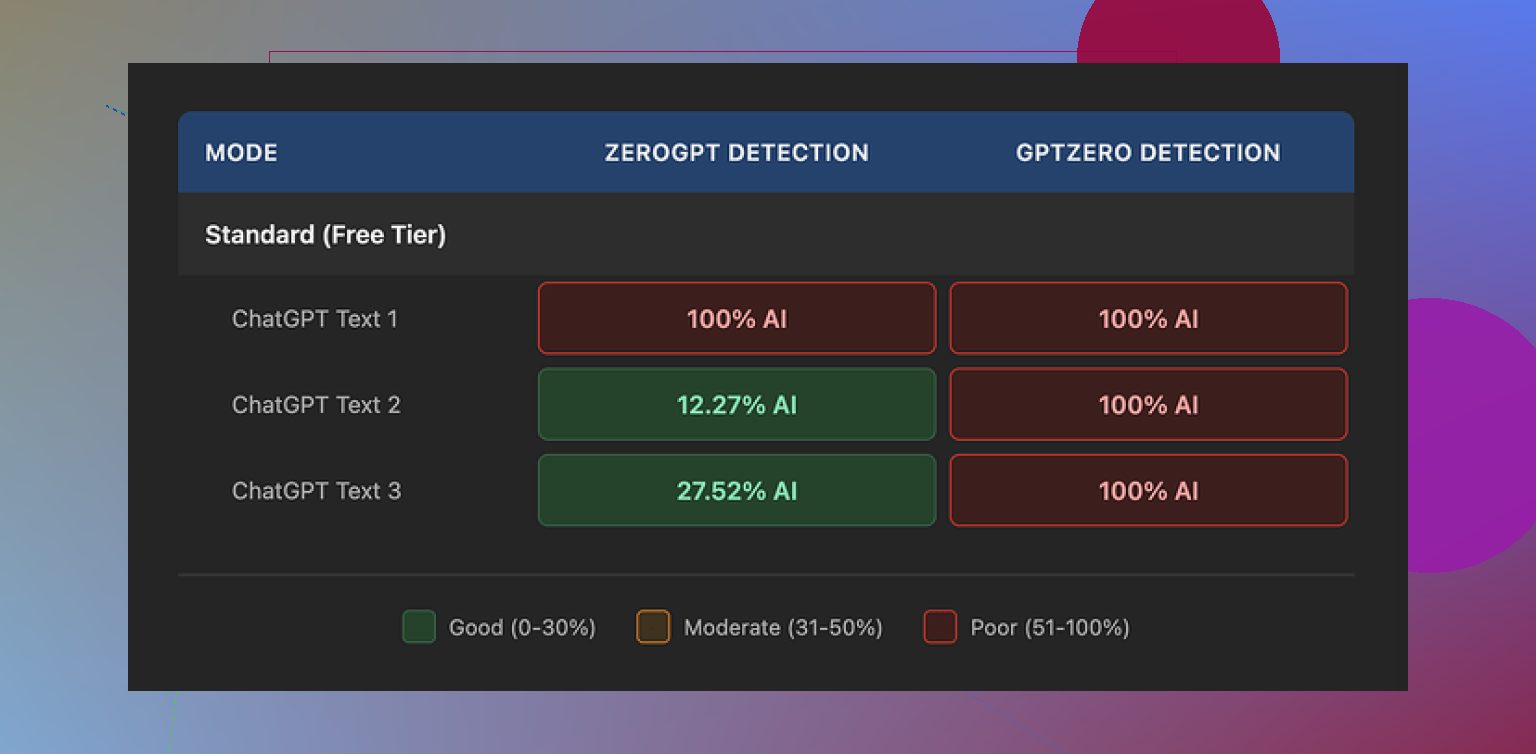
GPTZero
All three WriteHuman outputs came back as 100% AI. Not ‘mixed’, not ‘likely human’. Full AI each time. This is on the same detector their own marketing calls out.
ZeroGPT
Way more random.
• Sample 1: 100% AI
• Sample 2: around 12% AI
• Sample 3: around 28% AI
So in one run the tool looked useless, in another it looked half decent. Nothing reliable across runs. If you are trying to submit something where you only get one shot, this kind of variance is not your friend.
Writing quality and weirdness
The output does not feel stable. A few things jumped out:
• Tone swung around hard, even inside one piece. Paragraph one felt like one writer, paragraph three felt like someone else stepped in and finished.
• I caught a typo it introduced: ‘shfits’ instead of ‘shifts’. That was not in my source.
Those flaws might help you dodge some detectors, because detectors look for machine-style uniformity, but it makes the text awkward for any real use where someone human has to read it.
If you need something for work, clients, or school, you would need to proofread every line anyway. At that point, a human rewrite from scratch starts to look faster.
Screenshot from my run
Pricing and terms
This part annoyed me more than the detection results.
• Entry price: $12 per month if you pay annually, for the Basic plan
• Basic gives you 80 requests
• All paid plans unlock their ‘Enhanced Model’ and more tone options
So the free level is limited, and the thing they heavily push in the UI sits behind a paywall.
Now the terms:
• They explicitly say they do not guarantee bypass of any detector
• They have a strict no-refunds rule
• Anything you submit gets licensed for their AI training
So you pay, you send in your text, detection still flags it as AI, and they get to keep and train on your stuff. You have no way to get your money back if it fails for your use.
If you are not ok with your content being used for AI training, the only safe move is to skip it entirely.
Another screenshot from the test
Comparison with Clever AI Humanizer
I ran the same kind of workflow through Clever AI Humanizer after this. Details here if you want the longer breakdown:
On my runs:
• Clever AI Humanizer handled detection better, especially on the tools that hammered WriteHuman
• No paywall problem at the start, I did not hit the same upfront pricing barrier
So if your main goal is ‘reduce detection risk without mangling the text beyond use’, I had more success with Clever AI Humanizer than with WriteHuman.
Who WriteHuman might fit
From what I saw, WriteHuman feels like this:
• Maybe ok if you are experimenting and do not care about:
– data being used for model training
– strong guarantees
– strict budgets
• Weak fit if you:
– need repeatable, consistent detector performance
– want stable tone and clean text with minimal cleanup
– need clear refund options
If you try it, I would start with low-stakes content, run it through multiple detectors yourself, and never paste anything you are not comfortable handing to someone else for model training.
I had a similar experience to you and to what @mikeappsreviewer wrote, but my takeaway was a bit different.
Short version. WriteHuman helps a little with readability if your base text is stiff. It does not help much with AI detection in any consistent way. You need to treat it as a rewrite helper, not a stealth tool.
Here is what I saw in my tests.
- Readability and “human” feel
I fed in:
• a GPT‑4 blog intro
• a list-style how‑to article
• a technical explainer
What improved:
• Sentences got shorter.
• It broke up a few dense paragraphs.
• It added some transitions like “on the other hand,” “in practice,” etc.
What got worse:
• It sometimes padded simple points with vague filler.
• It changed specific words to more generic ones.
• On the technical piece, it softened precise language, which hurt clarity.
So if your text is robotic and too formal, you get a small gain. If your text is already decent, it tends to rewrite for the sake of rewriting.
My tip if you still want to use it:
• Use it on sections you know feel stiff, not the whole doc.
• Lock in key terms before you run it, then restore them if it dilutes meaning.
• Treat it as a first pass, then edit by hand for voice and accuracy.
- AI detection behavior
I disagree a bit with @mikeappsreviewer on one thing. For me, GPTZero did not always show 100 percent AI, but the results were still unreliable.
Example from one test batch:
• Original GPT‑4 text: GPTZero flagged 100 percent AI.
• After WriteHuman: one run flagged 92 percent AI, another run on the same source text dropped to 63 percent.
• ZeroGPT results bounced between 20 and 70 percent AI on different tries.
This tells me the tool shuffles style, but detection outcomes stay random. If your goal is “I need this to pass once with no second try”, it is a risk.
- Tone and consistency
I saw:
• Style shifts inside long pieces.
• Occasional word choice that sounded non-native.
• One or two small grammar slips, similar to the typo @mikeappsreviewer mentioned.
For anything client facing or academic, you still need a full proofread. At that point, your time tradeoff gets weak.
My way to use it:
• Short emails or quick blurbs where you want less AI vibe and you do not care about detectors.
• First drafts for social posts, then heavy manual edits.
I do not use it for:
• Long reports.
• Anything with strict tone guidelines.
• Anything tied to policy, legal, or technical detail.
- Pricing and data
I agree with the concerns on:
• Paywall around the better model.
• No refunds.
• Your text going into training.
If you write sensitive or proprietary stuff, I would not paste it there. For public content, it is still something to think about.
- Comparing with Clever AI Humanizer
If your priority is AI detection and not only style, Clever AI Humanizer worked better for me. On the same texts:
• GPTZero scores dropped much more and stayed low on repeat tests.
• Tone felt more stable and less “spun.”
I still edited manually, but I spent less time fixing weird phrasing. If you care about AI detectors, “Clever AI Humanizer” is worth testing side by side with WriteHuman on your own samples.
Practical tips if you keep testing:
• Always run your own A/B tests
Original vs WriteHuman vs Clever AI Humanizer
Check with 2 or 3 detectors, not one.
• Measure more than detection
Read the output out loud.
Check if your meaning changed.
See if the voice still sounds like you.
• Use it as a helper, not a crutch
Start with stronger prompts in your main AI tool.
Then use a humanizer lightly, or skip it and do a quick human edit pass.
If your content already reads fine to a human, a humanizer often adds risk without much gain.
I’m somewhere between @mikeappsreviewer and @viajantedoceu on this.
My experience: WriteHuman is basically a rephraser with a light style shuffle. It can nudge stiff GPT text toward something a bit more casual, but it’s not reliably “more human” in the way people usually mean.
Pros I actually saw:
- Sometimes breaks up long sentences and paragraphs.
- Occasionally introduces more natural connectors and a slightly less formal vibe.
- Useful if you’re in a rush and your baseline text is super robotic.
Cons that bugged me:
- It often just swaps words for synonyms and calls it a day.
- Meaning drift: on anything technical or nuanced, it watered down specifics.
- Tone feels stitched together: you can get “LinkedIn post meets ESL blog” in the same paragraph.
- You still have to fully edit and proofread, including fixing some awkward or flat out wrong word choices.
On the “is it just rewriting words” question: in practice, yes, most of the time. It is not doing deep structural editing like a good human editor would. It does not really learn or keep your personal voice. If your writing already reads fine, the “improvement” is tiny and the risk of weird phrasing goes up.
Where I disagree a bit with the other two: I don’t think the random detector scores are the main problem. Detectors are all over the place anyway. The bigger issue is that people expect some magic invisibility cloak. WriteHuman isn’t that. I’d treat all “humanizer” tools as style filters, not as anti-detection weapons.
How I’d use it, if you stick with it:
- Only on short chunks that feel stiff, not on whole long docs.
- Never on sensitive or proprietary content, given the training clause.
- Always compare against your original. If the new version isn’t clearly better to your eyes, revert.
If your real goal is “reduced AI detection risk without trashing readability,” then Clever AI Humanizer is worth testing side by side. In my runs it produced more stable tone and needed less fixing. Still not a perfect solution, but for AI-content users searching for a more natural style and slightly lower detector scores, “Clever AI Humanizer” lined up better with that use case.
Bottom line: WriteHuman is mildly useful as a quick rewriter. It is not a substitute for your own editing, and it’s not a dependable AI-detector bypass.